
As I mentioned in the previous post, REACT is a lightweight front end framework that used to build web applications or mobile applications(need REACT native to mobile apps). At the moment REACT is the most popular front end framework beating Angular and Vue. Being the most popular framework doesn’t mean that react is better that Angular or Vue. All of them have their unique features. But for some reason, developers all around the world use react more often than the other two frameworks.
React was created by Jordan Walke, a software engineer at Facebook. It was first deployed in the Facebook newsfeed in 2011 and later on the Instagram news feed on 2012. The React was made open source at JSConf US in May 2013. React native for mobile application development was introduced in February 2015 and made open-source on March 2015.
React Components
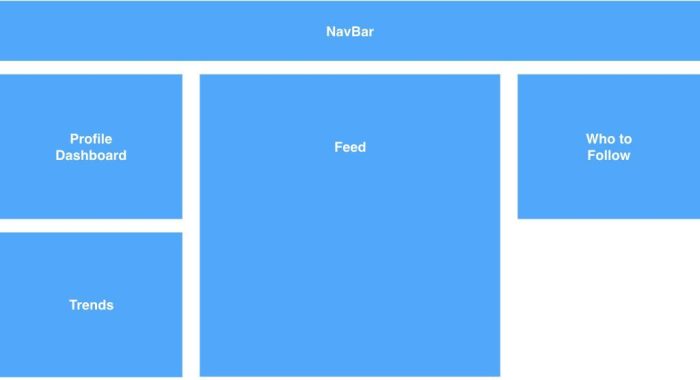
Components are like building blocks of UI’s. It’s a part of UI. Several components together create a single UI. These components can be reused in different UI. Component has a state and that state holds the data that belong to that component.
The following image is an example of a UI build with different components. All the components together create a single UI.
Setting Up The Developer Environment
Setting up the React developer environment is easy. First, go to nodejs.org and download and install node. Then you need a code editor to work with react. You can use any code editor. My personal preference is Visual Studio Code. You can download it from here.
Next to create a react app you just need to open the terminal in a folder location where you want to create your react project and enter the following command.
npx create-react-app
Then you can go to the project folder using the cd command. To open the project using VS code you can use the Command
code .
To run the project type the following command on the intergrated terminal in VS code or in terminal.
npm start
 Code Anatomy
Leave a comment